


[Aug 22, 2024] PAM-DEF Exam Dumps - 100% Marks In PAM-DEF Exam!
Exam Dumps Use Real CyberArk Defender Dumps With 240 Questions!
CyberArk PAM-DEF certification exam is intended for individuals who are responsible for designing, implementing, and maintaining CyberArk solutions. PAM-DEF exam covers a wide range of topics, including CyberArk architecture, installation, configuration, and troubleshooting. It also covers topics such as privileged account discovery, management, and monitoring, as well as CyberArk integration with other security solutions.
The CyberArk PAM-DEF exam consists of multiple-choice questions and is administered online. PAM-DEF exam is timed and candidates must complete it within the allotted time. PAM-DEF exam questions are designed to test the candidate's knowledge of CyberArk's Privileged Access Security solution and their ability to apply that knowledge in real-world scenarios.
NEW QUESTION # 119
ADR Vault became active due to a failure of the primary Vault. Service on the primary Vault has now been restored. Arrange the steps to return the DR vault to its normal standby mode in the correct sequence.
Answer:
Explanation:
Explanation
* Shut down the PrivateArk Server Service on the DR Vault.
* In the PADR.ini file, set Failover Mode = No and remove the last two lines.
* Start the PrivateArk Disaster Recovery Service.
Comprehensive Explanation: When the primary Vault service has been restored and you need to return the DR Vault to its normal standby mode, the steps are as follows:
* Shut down the PrivateArk Server Service on the DR Vault to stop the Vault from being active.
* Modify the PADR.ini file by setting Failover Mode to No and removing the last two lines that were added during the failover process. This reconfigures the DR Vault to standby mode.
* Start the PrivateArk Disaster Recovery Service to complete the transition back to standby mode1.
References:
* CyberArk Docs - Initiate a DR Failback to the Production Vault1
NEW QUESTION # 120
How do you create a cold storage backup?
- A. Configure the backup options in the PVWA.
- B. Install the Vault Backup utility on a different machine from the Enterprise Password Vault server and trigger the full backup.
- C. On the DR Vault, configure the cold storage backup path in TSParm.ini file.
- D. On the DR Vault, install PAReplicate according to the Installation guide, configure the logon ini file, and define the Schedule tasks for full and incremental backups.
Answer: B
NEW QUESTION # 121
You are onboarding 5,000 UNIX root accounts for rotation by the CPM. You discover that the CPM is unable to log in directly with the root account and will need to use a secondary account.
How should this be configured to allow for password management using least privilege?
- A. Configure each CPM to use the correct logon account.
- B. Configure the UNIX platform to use the correct reconcile account.
- C. Configure the UNIX platform to use the correct logon account.
- D. Configure each CPM to use the correct reconcile account.
Answer: C
Explanation:
Explanation
When onboarding a large number of UNIX root accounts for password rotation by the Central Policy Manager (CPM), and the CPM cannot log in directly with the root account, it is necessary to configure the UNIX platform to use a secondary logon account that has the appropriate privileges. This secondary account should have the minimum necessary permissions to perform password management tasks, adhering to the principle of least privilege1. By configuring the UNIX platform with the correct logon account, the CPM can use this account to manage the root accounts securely and efficiently.
References:
* CyberArk's official documentation on Least Privileges and Privileged Access Manager provides guidance on configuring on-demand privileges for UNIX environments, which includes setting up the correct logon account for tasks that require elevated privileges1.
* Additional information on managing UNIX and Linux accounts, including the configuration of logon and reconcile accounts, can be found in the Unix plugin documentation for CyberArk
NEW QUESTION # 122
What is the chief benefit of PSM?
- A. 'Privileged session isolation' and 'Privileged session recording'
- B. Automatic password management
- C. Privileged session isolation
- D. Privileged session recording
Answer: A
Explanation:
Explanation
According to the web search results, the chief benefit of PSM is to provide both privileged session isolation and privileged session recording. Privileged session isolation means that the PSM server acts as a proxy between the user and the target machine, preventing the user from directly accessing the target machine or exposing the privileged account credentials. Privileged session recording means that the PSM server captures and stores a video and a transcript of the user's activity on the target machine, enabling auditing and monitoring of the privileged session. These benefits help to enhance the security and compliance of the privileged access management solution, as they prevent credential exposure, restrict unauthorized access, detect malicious activity, and provide evidence for forensic analysis
NEW QUESTION # 123
Which onboarding method would you use to integrate CyberArk with your accounts provisioning process?
- A. Accounts Discovery
- B. PTA Rules
- C. Auto Detection
- D. Onboarding RestAPI functions
Answer: D
Explanation:
Explanation
The Onboarding RestAPI functions are a set of web services that allow you to integrate CyberArk with your accounts provisioning process. You can use the Onboarding RestAPI functions to create, update, delete, or verify accounts in the CyberArk Vault, as well as to retrieve information about accounts, platforms, and safes.
The Onboarding RestAPI functions are part of the Central Credential Provider component, which is installed on a dedicated server that communicates with the Vault. References:
* [Defender PAM Course], Module 4: Onboarding Accounts, Lesson: Onboarding RestAPI Functions
* [Onboarding RestAPI Functions Guide], Introduction
NEW QUESTION # 124
You are onboarding an account that is not supported out of the box.
What should you do first to obtain a platform to import?
- A. Create a service ticket in the customer portal explaining the requirements of the custom platform.
- B. From the platforms page, uncheck the "Hide non-supported platforms" checkbox and see if a platform meeting your needs appears.
- C. Visit the CyberArk marketplace and search for a platform that meets your needs.
- D. Search common community portals like stackoverflow, reddit, github for an existing platform.
Answer: A
NEW QUESTION # 125
A user requested access to view a password secured by dual-control and is unsure who to contact to expedite the approval process. The Vault Admin has been asked to look at the account and identify who can approve their request.
What is the correct location to identify users or groups who can approve?
- A. PVWA> Policies > Access Control (Safes) > Safe Members > Workflow > Authorize Password Requests
- B. PrivateArk > Admin Tools > Users and Groups > Auditors (Group Membership)
- C. PVWA> Account List > Edit > Show Advanced Settings > Dual Control > Direct Managers
- D. PVWA> Administration > Platform Configuration > Edit Platform > UI & Workflow > Dual Control> Approvers
Answer: A
NEW QUESTION # 126
How do you create a cold storage backup?
- A. On the DR Vault, install PAReplicate according to the Installation guide, configure the logon ini file, and define the Schedule tasks for full and incremental backups.
- B. Install the Vault Backup utility on a different machine from the Enterprise Password Vault server and trigger the full backup.
- C. Configure the backup options in the PVWA.
- D. On the DR Vault, configure the cold storage backup path in TSParm.ini file.
Answer: A
Explanation:
Explanation
To create a cold storage backup, you would install the PAReplicate utility on the DR Vault as per the installation guide. This utility is part of the CyberArk Vault's backup solution and is used to export the encrypted contents of your Safes securely to a computer outside the Vault environment. After installation, you would configure the logon ini file with the necessary credentials and define the scheduled tasks for both full and incremental backups. This ensures that the Safes are regularly backed up and that the data is available for recovery if needed1.
References:
* CyberArk's official documentation on using the CyberArk Backup Process, which includes details on the PAReplicate utility and how to configure it for cold storage backups1.
* Additional information on installing the Vault Backup Utility and configuring backup options, which
* provides context for the correct answer
NEW QUESTION # 127
DRAG DROP
Match the Status of Service on a DR Vault to what is displayed when it is operating normally in Replication mode.
Answer:
Explanation:
running
Cyber-Ark Hardened Windows Firewall
PrivateArk Database
CyberArk Vault Disaster Recovery
stopped
Cyber-Ark Event Notification Engine
PrivateArk Server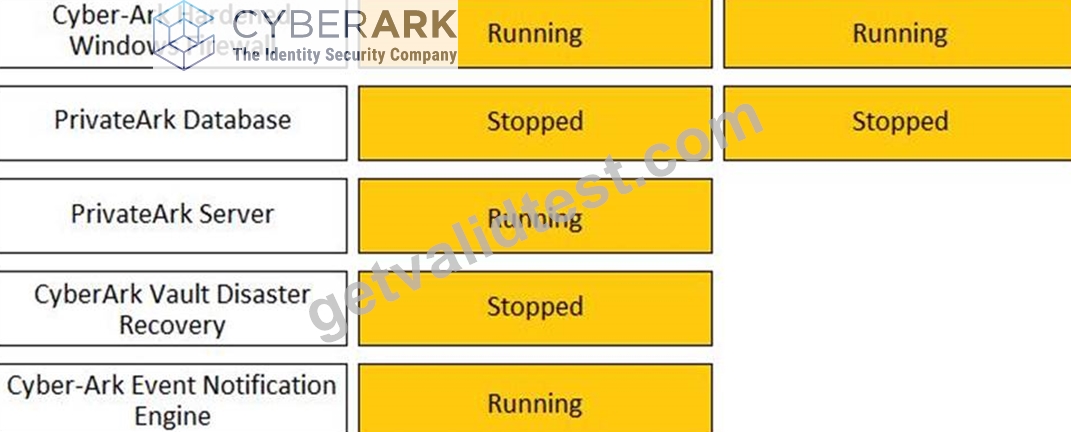
NEW QUESTION # 128
DRAG DROP
Match each key to its recommended storage location.
Answer:
Explanation: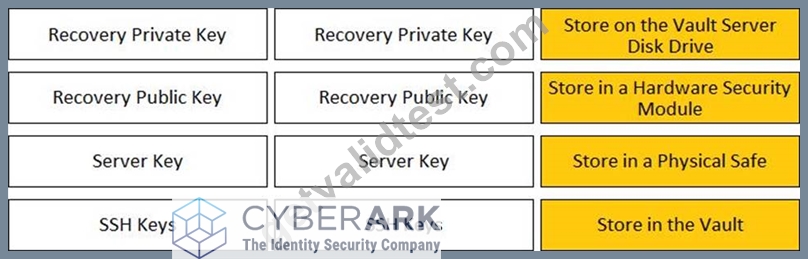
NEW QUESTION # 129
Which option in the Private Ark client is used to update users' Vault group memberships?
- A. Update > Authorizations tab
- B. Update > Group tab
- C. Update > General tab
- D. Update > Member Of tab
Answer: C
NEW QUESTION # 130
Which of the following Privileged Session Management (PSM) solutions support live monitoring of active sessions?
- A. PSM for SSH (previously known as PSM-SSH Proxy)
- B. PSM (i.e., launching connections by clicking on the connect button in the Password Vault Web Access (PVWA)
- C. All of the above
- D. PSM for Windows (previously known as RDP Proxy)
Answer: C
Explanation:
Explanation
According to the web search results, all of the Privileged Session Management (PSM) solutions support live monitoring of active sessions. PSM, PSM for Windows, and PSM for SSH enable authorized users to monitor active sessions from their workstation and take part in controlling these sessions. Users can also suspend or terminate active sessions based on their group assignment. By default, active session monitoring is enabled at system level for all authorized users, and can be disabled at platform level. Active session monitoring can also be disabled at system level, but when it is disabled, it cannot be enabled at platform level. PSM can automatically suspend or terminate sessions when notified by PTA or a third party threat analytics tool1. Authorized users monitor or terminate an active session using the same connection method (RDP file or HTML5 Gateway) as the end user
NEW QUESTION # 131
Which parameter controls how often the CPM looks for accounts that need to be changed from recently completed Dual control requests.
- A. Interval
- B. The CPM does not change the password under this circumstance
- C. ImmediateInterval
- D. HeadStartInterval
Answer: A
Explanation:
Explanation
This parameter controls how often the CPM looks for accounts that need to be changed from recently completed Dual control requests. It is set in the Master Policy under the Dual Control section. The value of this parameter determines the frequency of the CPM's verification process for accounts that have been accessed by users who have received confirmation from authorized Safe owners. The CPM will change the password of these accounts according to the value of this parameter. References:
* Dual Control - CyberArk
* Dual control in V10 Interface - docs.cyberark.com
* PAM-DEF CyberArk Defender - PAM Questions and Answers - Marks4sure
NEW QUESTION # 132
The Password upload utility can be used to create safes.
- A. FALS
- B. TRUE
Answer: B
NEW QUESTION # 133
Secure Connect provides the following. Choose all that apply.
- A. PSM connections from a terminal without the need to login to the PVWA
- B. PSM connections to target devices that are not managed by CyberArk.
- C. Real-time live session monitoring.
- D. Session Recording
Answer: B,C,D
Explanation:
Explanation
Secure Connect provides the following features:
* A. PSM connections to target devices that are not managed by CyberArk. This is true, because Secure Connect is a feature that enables users to connect to target systems through PSM without storing the account credentials in the vault. Secure Connect allows users to provide their own credentials at the time of connection, and these credentials are not saved or managed by CyberArk. Secure Connect can be used with any connection component that supports PSM, such as RDP, SSH, WinSCP, etc1.
* B. Session Recording. This is true, because Secure Connect sessions are recorded by PSM and stored in the Vault, just like regular PSM sessions. The recorded sessions can be viewed and audited by authorized users through the PVWA or the PSM web interface2.
* C. Real-time live session monitoring. This is true, because Secure Connect sessions can be monitored in real-time by authorized users through the PSM web interface. The PSM web interface allows users to view the live session screen, send messages to the session user, pause or terminate the session, and take
* control of the session if needed3.
The following feature is not provided by Secure Connect:
* D. PSM connections from a terminal without the need to login to the PVWA. This is false, because Secure Connect requires users to login to the PVWA and initiate the connection from there. The PVWA provides the URL for the Secure Connect session, which contains the target system address and the connection component ID. The user then needs to copy and paste the URL into a browser or a remote connection manager to launch the session1.
References:
* 1: Secure Connect
* 2: Recorded Sessions
* 3: PSM Web Interface
NEW QUESTION # 134
You want to generate a license capacity report.
Which tool accomplishes this?
- A. Password Vault Web Access
- B. RestAPI
- C. PrivateArk Client
- D. DiagnoseDB Report
Answer: C
NEW QUESTION # 135
......
Pass Your PAM-DEF Exam Easily With 100% Exam Passing Guarantee: https://www.getvalidtest.com/PAM-DEF-exam.html
PAM-DEF Dumps are Available for Instant Access: https://drive.google.com/open?id=1kYBEU5R0EJrNIrXYUfmamJoRJI6UrdU1