


Fortinet FCP_FAZ_AN-7.6 Practice Test Pdf Exam Material
FCP_FAZ_AN-7.6 Answers FCP_FAZ_AN-7.6 Free Demo Are Based On The Real Exam
Fortinet FCP_FAZ_AN-7.6 Exam Syllabus Topics:
| Topic | Details |
|---|---|
| Topic 1 |
|
| Topic 2 |
|
| Topic 3 |
|
| Topic 4 |
|
NEW QUESTION # 28
Refer to the exhibit. A fortiAnalyzer analyst is customizing a SQL query to use in a report.
Which SQL query should the analyst run to get the expected results?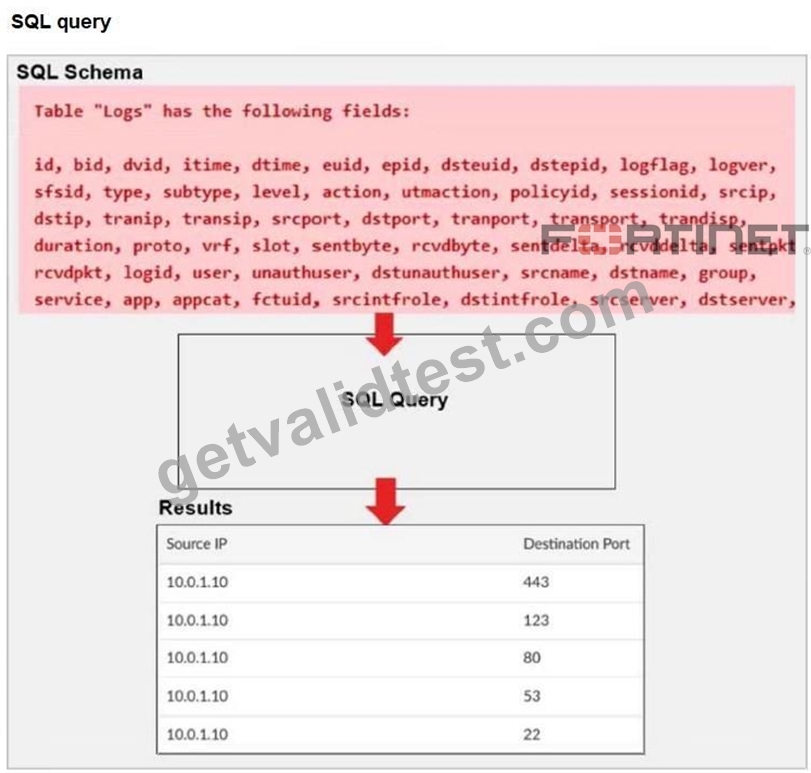
SELECT srcip AS "Source IP", dstport AS "Destination Port"
- A. FROM $log
WHERE $filter AND srcip = '10.0.1.10'
ORDER BY dstport
GROUP by srcip, dstport DESC - B. FROM $log
WHERE $filter AND srcip = '10.0.1.10'
GROUP BY srcip, dstport
ORDER BY dstport DESC
SELECT srcip AS "Source IP", dstport AS "Destination Port" - C. ORDER BY dstport DESC
GROUP BY srcip, dstport
FROM $log
WHERE $filter AND srcip = '10.0.1.10'
SELECT srcip AS "Source IP", dstport AS "Destination Port" - D. FROM $log
WHERE $filter AND Source IP != '10.0.1.10'
GROUP BY srcip, dstport
ORDER BY dstport DESC
SELECT srcip AS "Source IP", dstport AS "Destination Port"
Answer: B
Explanation:
The correct SQL syntax with SELECT, FROM, WHERE, GROUP BY, and ORDER BY clauses in the right order. It filters for srcip = '10.0.1.10' and orders the results by destination port descending, matching the expected output.
NEW QUESTION # 29
Which statement about exporting items in Report Definitions is true?
- A. Datasets can be exported.
- B. Chart exports contain associated datasets.
- C. Templates can be exported.
- D. Template exports contain associated charts and datasets.
Answer: B
Explanation:
You can't export templates and datasets. However, when you import an exported report, you can save the layout of the report as a template. When you export a chart, the associated dataset is exported with it, so when you import an exported chart, the associated dataset is imported as well.
NEW QUESTION # 30
Which two modules can be imported and exported between ADOMs on FortiAnalyzer? (Choose two.)
- A. Reports
- B. Datasets
- C. Charts
- D. Templates
Answer: B,C
Explanation:
Datasets and charts can be exported and imported between ADOMs, allowing reuse of custom queries and visual components across different administrative domains.
NEW QUESTION # 31
Which statement describes archive logs on FortiAnalyzer?
- A. Logs that are indexed and stored in the SQL database
- B. Logs a FortiAnalyzer administrator can access in FortiView
- C. Logs previously collected from devices that are offline
- D. Logs compressed and saved in files with the .gz extension
Answer: D
Explanation:
In FortiAnalyzer, archive logs refer to logs that have been compressed and stored to save space. This process involves compressing the raw log files into the .gz format, which is a common compression format used in Fortinet systems for archived data. Archiving is essential in FortiAnalyzer to optimize storage and manage long-term retention of logs without impacting performance.
Let's examine each option for clarity:
* Option A: Logs that are indexed and stored in the SQL database
* This is incorrect. While some logs are indexed and stored in an SQL database for quick access and searchability, these are not classified as archive logs. Archived logs are typically moved out of the database and compressed.
* Option B: Logs a FortiAnalyzer administrator can access in FortiView
* This is incorrect because FortiView primarily accesses logs that are active and indexed, not archived logs. Archived logs are stored for long-term retention but are not readily available for immediate analysis in FortiView.
* Option C: Logs compressed and saved in files with the .gz extension
* This is correct. Archive logs on FortiAnalyzer are stored in compressed .gz files to reduce space usage. This archived format is used for logs that are no longer immediately needed in the SQL database but are retained for historical or compliance purposes.
* Option D: Logs previously collected from devices that are offline
* This is incorrect. Although archived logs may include data from devices that are no longer online, this is not a defining characteristic of archive logs.
* FortiAnalyzer 7.4.1 documentation and configuration guides outline that archived logs are stored in compressed files with the .gz extension to conserve storage space, ensuring FortiAnalyzer can handle a larger volume of logs over extended periods.
NEW QUESTION # 32
Which statement about the FortiSOAR management extension is correct?
- A. It requires a dedicated FortiSOAR device or VM.
- B. It runs as a docker container on FortiAnalyzer.
- C. It does not include a limited trial by default.
- D. It requires a FortiManager configured to manage FortiGate.
Answer: A
Explanation:
The FortiSOAR management extension is designed as an independent security orchestration, automation, and response (SOAR) solution that integrates with other Fortinet products but requires its own dedicated device or virtual machine (VM) environment. FortiSOAR is not natively integrated as a container or service within FortiAnalyzer or FortiManager, and it operates separately to manage complex security workflows and incident responses across various platforms.
NEW QUESTION # 33
Which three types of traffic does the safeguarding event handler scan? (Choose three.)
- A. Application
- B. VoIP
- C. DNS
- D. Web
- E. Email
Answer: C,D,E
Explanation:
The safeguarding event handler analyzes web, email, and DNS traffic, since these categories are most commonly used to detect malicious or suspicious activity that may indicate compromised hosts or unsafe communications.
NEW QUESTION # 34
What is the purpose of using data selectors when configuring event handlers?
- A. They download new filters can be used in event handlers.
- B. They are common filters that can be applied simultaneously to all event handlers.
- C. They filter the types of logs that FortiAnalyzer can accept from registered devices.
- D. They apply their filter criteria to the entire event handler so that you don't have to configure the same criteria in the individual rules.
Answer: D
Explanation:
When configuring event handlers on FortiAnalyzer, data selectors act as global filter criteria.
These filters are applied at the event handler level, allowing all rules within that handler to inherit the same conditions. This avoids the need to repeatedly configure identical filters for each individual rule.
NEW QUESTION # 35
Which two statements about local logs on FortiAnalyzer are true? (Choose two.)
- A. Local logs are not displayed in FortiView.
- B. Application control logs are ADOM specific.
- C. Event logs are available in the root ADOM.
- D. Playbook logs for all ADOMs are in the root ADOM.
Answer: B,D
Explanation:
Playbook logs, which relate to automated incident response actions, can be viewed centrally in the root ADOM, allowing visibility across all ADOMs.
Event logs on FortiAnalyzer typically provide system-wide information applicable to the entire FortiAnalyzer unit, while application logs are specific to each ADOM, reflecting the logs related to devices and activities managed within that ADOM.
https://docs.fortinet.com/document/fortianalyzer/7.6.3/administration-guide/208717/enabling-and- disabling-the-adom-feature
NEW QUESTION # 36
Which statement correctly describes one Difference between templates and reports?
- A. Reports support macros, but templates do not.
- B. Templates can be cloned, but reports cannot be cloned.
- C. Template are mapped to device groups. while reports are mapped to ADOMs
- D. Reports provide mora configuration options than templates
Answer: C
NEW QUESTION # 37
You are trying to configure a task in the playbook editor to run a report. However, when you try to select the desired playbook, you do to see it listed.
What is the reason?
- A. The report has no result and must be reconfigured.
- B. The playbook is currently running and will be available after it is finished.
- C. The report does not have auto-cache and extended log filtering enabled.
- D. You must create a trigger to run the report first.
Answer: C
NEW QUESTION # 38
Refer to the exhibit. What conclusion can you draw from the exhibit?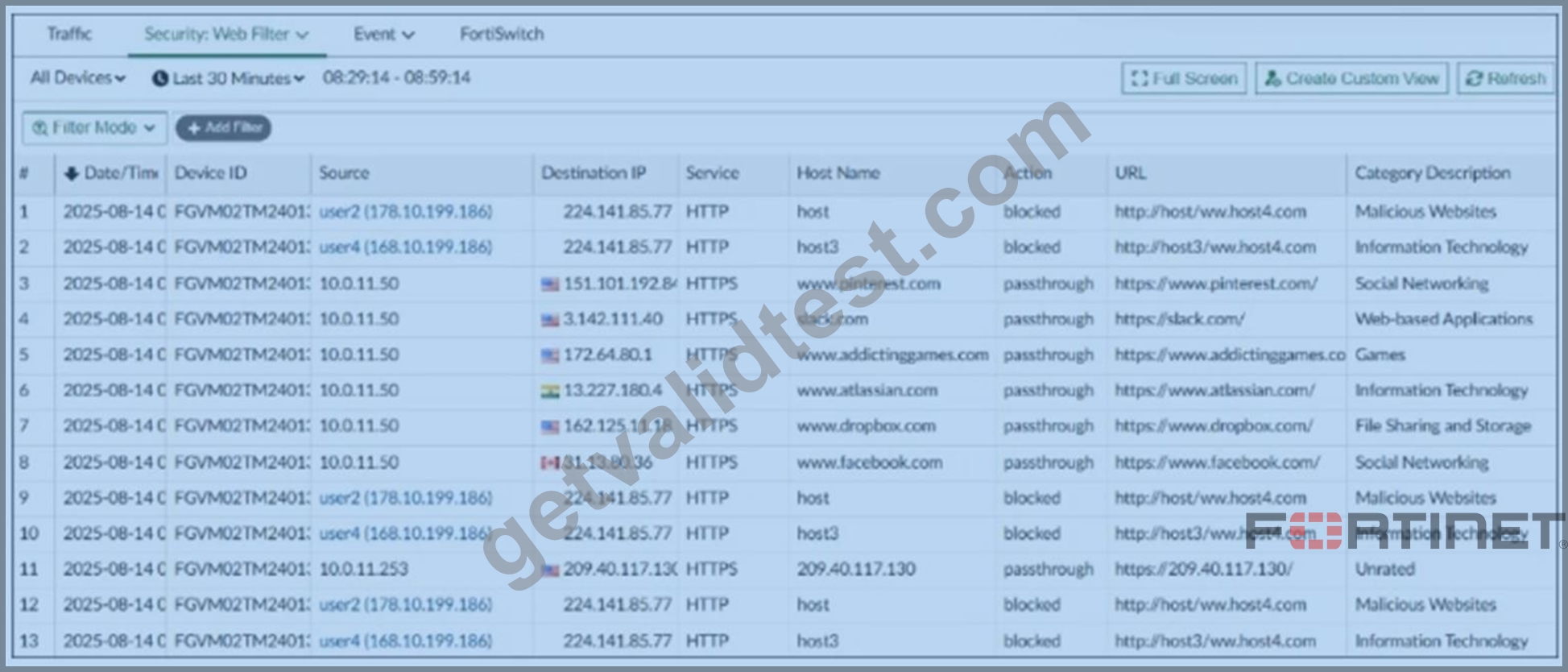
- A. This is a custom view that was set by the analyst.
- B. Unrated websites are being blocked.
- C. These are application control logs from FortiGate.
- D. Social networking websites are being allowed.
Answer: D
Explanation:
The exhibit shows Social Networking category entries such as facebook.com and pinterest.com with the action set to passthrough, indicating that social networking websites are being allowed rather than blocked.
NEW QUESTION # 39
An administrator on your team has configured multiple reports to run periodically. Management has requested that all new generated reports be sent to a company email inbox for accessibility.
The mail server has already been configured on FortiAnalyzer.
Which item must you configure on FortiAnalyzer so that emails are sent when the reports are generated?
- A. Configure a new data policy for log uploads to email.
- B. Enable the option to email all reports under the mail server.
- C. Configure the email notifications section under the report calendar.
- D. Enable an output profile on the reports.
Answer: D
Explanation:
To automatically send generated reports by email, you must configure and enable an output profile on each report. The output profile defines the delivery method, including email recipients, and ensures that reports are sent when they are generated according to their schedule.
NEW QUESTION # 40
Refer to the exhibit. What is the purpose of using the Chart Builder feature on FortiAnalyzer?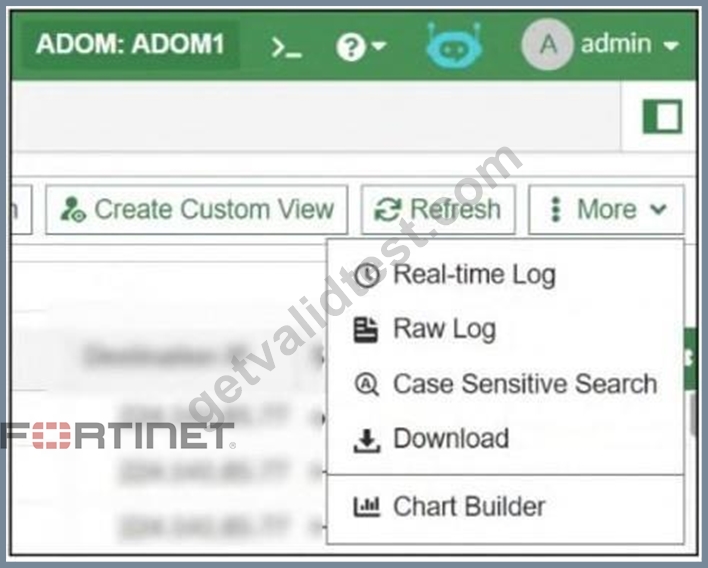
- A. To build a dataset and chart based on the filtered search results
- B. To add charts directly to generate reports in the current ADOM
- C. To add a new chart under FortiView to be used in new reports
- D. To build a chart automatically based on the top 100 log entries
Answer: A
Explanation:
A quick way to build a custom dataset and chart is to use the chart builder tool. This tool is located in LogView, and allows you to build a dataset and chart automatically, based on your filtered search results. In LogView, set filters to return the logs you want.
NEW QUESTION # 41
You are tasked with finding logs corresponding to a suspected attack on your network. You need to use an interface where all identified threats within timeframe are listed and organized. You also need to be able to quickly export the information to a PDF file.
Where can you go to accomplish this task?
- A. FortiView
- B. Log View
- C. Fabric View
- D. Log Browse
Answer: A
Explanation:
FortiView is a comprehensive monitoring system on FortiAnalyzer that integrates real-time and historical data into a single view, including threats. It provides intuitive summary dashboards listing top threats, sources, destinations, and more, all filterable by timeframe and other criteria.
FortiView allows drill-down into detailed threat information and supports exporting data and reports, including to PDF format, facilitating quick sharing and analysis.
https://docs.fortinet.com/document/fortigate/7.6.3/administration-guide/96300/using-the-fortiview- interface
NEW QUESTION # 42
Refer to the exhibit with partial output: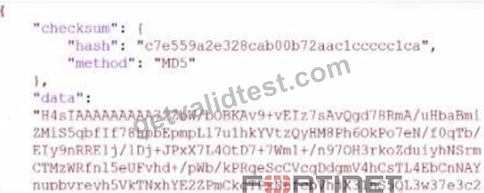
Your colleague exported a playbook and has sent it to you for review. You open the file in a text editor and observer the output as shown in the exhibit.
Which statement about the export is true?
- A. The export data type is zipped.
- B. The playbook is misconfigured.
- C. Your colleague put a password on the export.
- D. The option to include the connector was not selected.
Answer: A
Explanation:
In the exhibit, the data structure shows a checksum field and a data field with a long, seemingly encoded string. This format is indicative of a file that has been compressed or encoded for storage and transfer.
Export Data Type:
The data field is likely a base64-encoded string, which is commonly used to represent binary data in text format. Base64 encoding is often applied to data that has been compressed (zipped) for easier handling and transfer. The checksum field, with an MD5 hash, provides a way to verify the integrity of the data after decompression.
NEW QUESTION # 43
Refer to the exhibit. What does the data point at 12:20 indicate?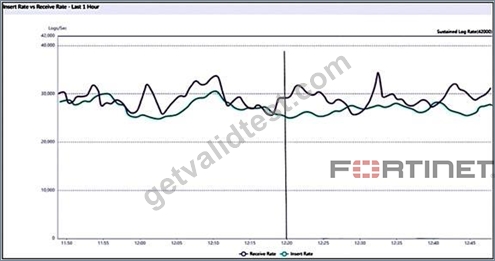
- A. The performance of FortiAnalyzer is below the baseline.
- B. FortiAnalyzer is using its cache to avoid dropping logs.
- C. The sqiplugind service is caught up with the logs
- D. The log insert log time is increasing.
Answer: D
Explanation:
Insert Rate vs. Receive Rate is a graph that shows the rate at which raw logs reach the FortiAnalyzer (receive rate) and the rate at which they are indexed (insert rate) by the SQL database and the sqlplugind daemon. At minimum, the difference between these parameters should be generally consistent.
Log Insert Lag Time shows the amount of time between when a log was received and when it was indexed. Ideally, this parameter should be as small as possible with the occasional spikes according to the network activity being logged. A good baseline should be created to allow for the identification of possible performance issues.
NEW QUESTION # 44
Which statement regarding macros on FortiAnalyzer is true?
- A. Macros are predefined templates for reports and cannot be customized.
- B. Macros are supported only on the FortiGate ADOMs.
- C. Macros are useful in generating excel log files automatically based on the report settings.
- D. Macros are ADOM-specific and each ADOM type have unique macros relevant to that ADOM.
Answer: C
Explanation:
Macros in FortiAnalyzer are used to streamline reporting tasks by automating data extraction and report generation. Here's a breakdown of each option to determine the correct answer:
* Option A - Macros are Predefined Templates for Reports and Cannot be Customized:
* This statement is incorrect. Macros in FortiAnalyzer are not simply fixed templates; they allow for customization to tailor data extraction and reporting based on specific needs and configurations.
* Conclusion: Incorrect.
* Option B - Macros are Useful in Generating Excel Log Files Automatically Based on the Report Settings:
* This statement is accurate. Macros in FortiAnalyzer can be configured to automate the generation of reports, including outputting log data to Excel format based on predefined report settings. This makes them especially useful for scheduled reporting and data analysis.
* Conclusion: Correct.
* Option C - Macros are ADOM-Specific and Each ADOM Type Has Unique Macros Relevant to that ADOM:
* Macros are not limited to specific ADOMs, nor are they ADOM-specific. Macros can be applied across various ADOMs based on report configurations but are not inherently tied to or unique for each ADOM type.
* Conclusion: Incorrect.
* Option D - Macros are Supported Only on the FortiGate ADOMs:
* This is not true. Macros in FortiAnalyzer are not restricted to FortiGate ADOMs; they can be utilized across different ADOMs that FortiAnalyzer manages.
* Conclusion: Incorrect.
Conclusion:
* Correct Answer: B. Macros are useful in generating excel log files automatically based on the report settings.
* This answer correctly describes the functionality of macros in FortiAnalyzer, emphasizing their role in automating report generation, especially for Excel log files.
References:
FortiAnalyzer 7.4.1 documentation on macros and report generation functionalities.
NEW QUESTION # 45
Refer to the exhibit. What is the purpose of using the Chart Builder feature on FortiAnalyzer?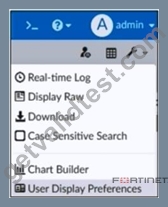
- A. To build a dataset and chart based on the filtered search results
- B. To add a new chart under FortiView to be used in new reports
- C. To build a chart automatically based on the top 100 log entries
- D. To add charts directly to generate reports in the current ADOM.
Answer: A
Explanation:
A quick way to build a custom dataset and chart is to use the chart builder tool. This tool is located in LogView, and allows you to build a dataset and chart automatically, based on your filtered search results. In LogView, set filters to return the logs you want.
NEW QUESTION # 46
Refer to the exhibit. An analyst is trying to create a dataset to pull all gambling websites that were visited by end users.
Which SQL query on FortiAnalyzer will give the result shown in the exhibit?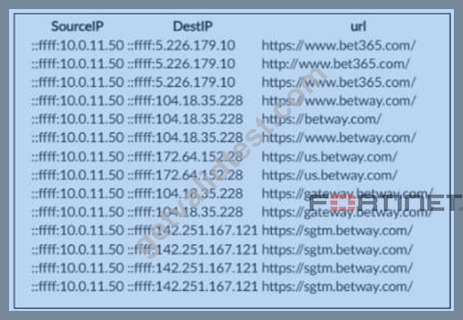
select srcip as "SourceIP", dstip as "DestIP", url from $log where
- A. catdesc = 'Dating'
select srcip as "SourceIP", dstip as "DestIP", url from 'Gambling' where - B. catdesc = 'Gambling'
select srcip as "SourceIP", dstip as "DestIP", url from $log where - C. catdesc = $log
select srcip as "SourceIPv6", dstip as "DestIPv6", url from $log where - D. catdesc = 'Gambling'
Answer: D
Explanation:
This query selects the source IP, destination IP, and URL from the log data and filters results to only entries categorized as Gambling, which produces a list of visited gambling websites like those shown in the exhibit.
NEW QUESTION # 47
When managing incidents on FortiAnlyzer, what must an analyst be aware of?
- A. Incidents must be acknowledged before they can be analyzed.
- B. You can manually attach generated reports to incidents.
- C. The status of the incident is always linked to the status of the attach event.
- D. Severity incidents rated with the level High have an initial service-level agreement (SLA) response time of 1 hour.
Answer: B
Explanation:
In FortiAnalyzer's incident management system, analysts have the option to manually manage incidents, which includes attaching relevant reports to an incident for further investigation and documentation. This feature allows analysts to consolidate information, such as detailed reports on suspicious activity, into an incident record, providing a comprehensive view for incident response.
Let's review the other options to clarify why they are incorrect:
* Option A: You can manually attach generated reports to incidents
* This is correct. FortiAnalyzer allows analysts to manually attach reports to incidents, which is beneficial for providing additional context, evidence, or analysis related to the incident. This functionality is part of the incident management process and helps streamline information for tracking and resolution.
* Option B: The status of the incident is always linked to the status of the attached event
* This is incorrect. The status of an incident on FortiAnalyzer is managed independently of the status of any attached events. An incident can contain multiple events, each with different statuses, but the incident itself is tracked separately.
* Option C: Severity incidents rated with the level High have an initial service-level agreement (SLA) response time of 1 hour
* This is incorrect. While incidents have severity levels, specific SLA response times are typically set according to the organization's incident response policy, and FortiAnalyzer does not impose a default SLA response time of 1 hour for high-severity incidents.
* Option D: Incidents must be acknowledged before they can be analyzed
* This is incorrect. Incidents on FortiAnalyzer can be analyzed even if they are not yet acknowledged. Acknowledging an incident is often part of the workflow to mark it as being actively addressed, but it is not a prerequisite for analysis.
* According to FortiAnalyzer documentation, analysts can attach reports to incidents manually, making option A correct. This feature enables better tracking and documentation within the incident management system on FortiAnalyzer.
NEW QUESTION # 48
Which two statements about local logs on FortiAnalyzer are true? (Choose two.)
- A. Event logs show system-wide information, whereas application logs are ADOM specific.
- B. You can view playbook logs for all ADOMs in the root ADOM.
- C. They are not supported in FortiView.
- D. Event logs are available only in the root ADOM.
Answer: A,B
Explanation:
Playbook logs, which relate to automated incident response actions, can be viewed centrally in the root ADOM, allowing visibility across all ADOMs.
Event logs on FortiAnalyzer typically provide system-wide information applicable to the entire FortiAnalyzer unit, while application logs are specific to each ADOM, reflecting the logs related to devices and activities managed within that ADOM.
https://docs.fortinet.com/document/fortianalyzer/7.6.3/administration-guide/208717/enabling-and- disabling-the-adom-feature
NEW QUESTION # 49
Which three types of indicators can FortiAnalyzer identify? (Choose three.)
- A. Host name
- B. Email address
- C. IP address
- D. URL
- E. Domain
Answer: C,D,E
Explanation:
FortiAnalyzer's IOC engine identifies common network-based indicators such as domains, URLs, and IP addresses, which are used for correlation and threat detection across logs.
NEW QUESTION # 50
What is the purpose of running the command diagnose sql status sqlreportd?
- A. To list the current SQL processes running
- B. To view a list of scheduled reports
- C. To identify the database log insertion status
- D. To display the SQL query connections and hcache status
Answer: D
Explanation:
The command diagnose sql status sqlreportd is used in FortiAnalyzer to obtain specific information about the SQL reporting process and caching status. Here's what this command accomplishes and an analysis of each option:
Command Functionality:
sqlreportd is the FortiAnalyzer daemon responsible for managing SQL-based reporting processes. The diagnose sql status sqlreportd command provides information on active SQL query connections and the hcache (historical cache) status, which helps in monitoring and troubleshooting SQL report generation.
NEW QUESTION # 51
Exhibit.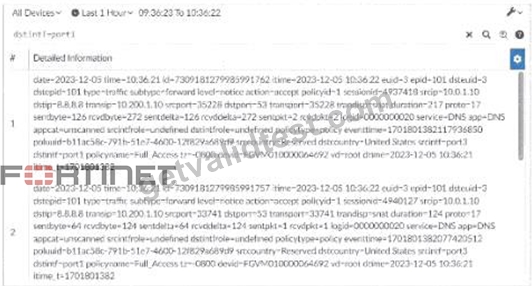
What can you conclude about these search results? (Choose two.)
- A. They are sortable by columns and customizable.
- B. They can be downloaded to a file.
- C. They are not available for analysis in FortiView.
- D. They were searched by using text mode.
Answer: B,D
NEW QUESTION # 52
......
FCP_FAZ_AN-7.6 [Apr-2026] Newly Released] Exam Questions For You To Pass: https://www.getvalidtest.com/FCP_FAZ_AN-7.6-exam.html
Fortinet FCP_FAZ_AN-7.6 Exam: Basic Questions With Answers: https://drive.google.com/open?id=1UndsGu2ojjZef-rFKYHoaXszyIosfqLN