


PT0-003 Questions Prepare with Learning Information! 2024 Regularly updated
Get PT0-003 Products Practice Material for PT0-003 Exam Question Preparation
NEW QUESTION # 22
A penetration tester needs to help create a threat model of a custom application. Which of the following is the most likely framework the tester will use?
- A. CI/CD
- B. OSSTMM
- C. DREAD
- D. MITRE ATT&CK
Answer: C
Explanation:
The DREAD model is a risk assessment framework used to evaluate and prioritize the security risks of an application. It stands for Damage potential, Reproducibility, Exploitability, Affected users, and Discoverability.
Step-by-Step Explanation
Understanding DREAD:
Purpose: Provides a structured way to assess and prioritize risks based on their potential impact and likelihood.
Components:
Damage Potential: The extent of harm that an exploit could cause.
Reproducibility: How easily the exploit can be reproduced.
Exploitability: The ease with which the vulnerability can be exploited.
Affected Users: The number of users affected by the exploit.
Discoverability: The likelihood that the vulnerability will be discovered.
Usage in Threat Modeling:
Evaluation: Assign scores to each DREAD component to assess the overall risk.
Prioritization: Higher scores indicate higher risks, helping prioritize remediation efforts.
Process:
Identify Threats: Enumerate potential threats to the application.
Assess Risks: Use the DREAD model to evaluate each threat.
Prioritize: Focus on addressing the highest-scoring threats first.
Reference from Pentesting Literature:
The DREAD model is widely discussed in threat modeling and risk assessment sections of penetration testing guides.
HTB write-ups often include references to DREAD when explaining how to assess and prioritize vulnerabilities in applications.
Reference:
Penetration Testing - A Hands-on Introduction to Hacking
HTB Official Writeups
NEW QUESTION # 23
During the reconnaissance phase, a penetration tester collected the following information from the DNS records:
A-----> www
A-----> host
TXT --> vpn.comptia.org
SPF---> ip =2.2.2.2
Which of the following DNS records should be in place to avoid phishing attacks using spoofing domain techniques?
- A. MX
- B. SOA
- C. DMARC
- D. CNAME
Answer: C
Explanation:
DMARC (Domain-based Message Authentication, Reporting & Conformance) is an email authentication protocol that helps prevent email spoofing and phishing. It builds on SPF (Sender Policy Framework) and DKIM (DomainKeys Identified Mail) to provide a mechanism for email senders and receivers to improve and monitor the protection of the domain from fraudulent email.
Step-by-Step Explanation
Understanding DMARC:
SPF: Defines which IP addresses are allowed to send emails on behalf of a domain.
DKIM: Provides a way to check that an email claiming to come from a specific domain was indeed authorized by the owner of that domain.
DMARC: Uses SPF and DKIM to determine the authenticity of an email and specifies what action to take if the email fails the authentication checks.
Implementing DMARC:
Create a DMARC policy in your DNS records. This policy can specify to reject, quarantine, or take no action on emails that fail SPF or DKIM checks.
Example DMARC record: v=DMARC1; p=reject; rua=mailto:[email protected]; Benefits of DMARC:
Helps to prevent email spoofing and phishing attacks.
Provides visibility into email sources through reports.
Enhances domain reputation by ensuring only legitimate emails are sent from the domain.
DMARC Record Components:
v: Version of DMARC.
p: Policy for handling emails that fail the DMARC check (none, quarantine, reject).
rua: Reporting URI of aggregate reports.
ruf: Reporting URI of forensic reports.
pct: Percentage of messages subjected to filtering.
Real-World Example:
A company sets up a DMARC policy with p=reject to ensure that any emails failing SPF or DKIM checks are rejected outright, significantly reducing the risk of phishing attacks using their domain.
Reference from Pentesting Literature:
In "Penetration Testing - A Hands-on Introduction to Hacking," DMARC is mentioned as part of email security protocols to prevent phishing.
HTB write-ups often highlight the importance of DMARC in securing email communications and preventing spoofing attacks.
Reference:
Penetration Testing - A Hands-on Introduction to Hacking
HTB Official Writeups
NEW QUESTION # 24
A penetration tester discovers data to stage and exfiltrate. The client has authorized movement to the tester's attacking hosts only. Which of the following would be most appropriate to avoid alerting the SOC?
- A. Apply Base64 to the data and send over a tunnel to TCP port 80.
- B. Apply UTF-8 to the data and send over a tunnel to TCP port 25.
- C. Apply 3DES to the data and send over a tunnel UDP port 53.
- D. Apply AES-256 to the data and send over a tunnel to TCP port 443.
Answer: D
Explanation:
AES-256 (Advanced Encryption Standard with a 256-bit key) is a symmetric encryption algorithm widely used for securing data. Sending data over TCP port 443, which is typically used for HTTPS, helps to avoid detection by network monitoring systems as it blends with regular secure web traffic.
Step-by-Step Explanation
Encrypting Data with AES-256:
Use a secure key and initialization vector (IV) to encrypt the data using the AES-256 algorithm.
Example encryption command using OpenSSL:
openssl enc -aes-256-cbc -salt -in plaintext.txt -out encrypted.bin -k secretkey Setting Up a Secure Tunnel:
Use a tool like OpenSSH to create a secure tunnel over TCP port 443.
Example command to set up a tunnel:
ssh -L 443:targetserver:443 user@intermediatehost
Transferring Data Over the Tunnel:
Use a tool like Netcat or SCP to transfer the encrypted data through the tunnel.
Example Netcat command to send data:
cat encrypted.bin | nc targetserver 443
Benefits of Using AES-256 and Port 443:
Security: AES-256 provides strong encryption, making it difficult for attackers to decrypt the data without the key.
Stealth: Sending data over port 443 helps avoid detection by security monitoring systems, as it appears as regular HTTPS traffic.
Real-World Example:
During a penetration test, the tester needs to exfiltrate sensitive data without triggering alerts. By encrypting the data with AES-256 and sending it over a tunnel to TCP port 443, the data exfiltration blends in with normal secure web traffic.
Reference from Pentesting Literature:
Various penetration testing guides and HTB write-ups emphasize the importance of using strong encryption like AES-256 for secure data transfer.
Techniques for creating secure tunnels and exfiltrating data covertly are often discussed in advanced pentesting resources.
Reference:
Penetration Testing - A Hands-on Introduction to Hacking
HTB Official Writeups
NEW QUESTION # 25
After compromising a system, a penetration tester wants more information in order to decide what actions to take next. The tester runs the following commands:
Which of the following attacks is the penetration tester most likely trying to perform?
- A. Resource exhaustion
- B. Credential harvesting
- C. Container escape techniques
- D. Metadata service attack
Answer: D
Explanation:
The penetration tester is most likely trying to perform a metadata service attack, which is an attack that exploits a vulnerability in the metadata service of a cloud provider. The metadata service is a service that provides information about the cloud instance, such as its IP address, hostname, credentials, user data, or role permissions. The metadata service can be accessed from within the cloud instance by using a special IP address, such as 169.254.169.254 for AWS, Azure, and GCP. The commands that the penetration tester runs are curl commands, which are used to transfer data from or to a server. The curl commands are requesting data from the metadata service IP address with different paths, such as
/latest/meta-data/iam/security-credentials/ and /latest/user-data/. These paths can reveal sensitive information about the cloud instance, such as its IAM role credentials or user data scripts. The penetration tester may use this information to escalate privileges, access other resources, or perform other actions on the cloud environment. The other options are not likely attacks that the penetration tester is trying to perform.
NEW QUESTION # 26
During a security assessment, a penetration tester gains access to an internal server and manipulates some data to hide its presence. Which of the following is the best way for the penetration tester to hide the activities performed?
- A. Alter the log permissions.
- B. Clear the Windows event logs.
- C. Modify the system time.
- D. Reduce the log retention settings.
Answer: B
Explanation:
During a penetration test, one of the critical steps for maintaining access and covering tracks is to clear evidence of the attack. Manipulating data to hide activities on an internal server involves ensuring that logs and traces of the attack are removed. Here's a detailed explanation of why clearing the Windows event logs is the best method for this scenario:
Understanding Windows Event Logs: Windows event logs are a key forensic artifact that records system, security, and application events. These logs can provide detailed information about user activities, system changes, and potential security incidents.
Why Clear Windows Event Logs:
Comprehensive Coverage: Clearing the event logs removes all recorded events, including login attempts, application errors, and security alerts. This makes it difficult for an investigator to trace back the actions performed by the attacker.
Avoiding Detection: Penetration testers clear event logs to ensure that their presence and activities are not detected by system administrators or security monitoring tools.
Method to Clear Event Logs:
Use the built-in Windows command line utility wevtutil to clear logs. For example:
shell
Copy code
wevtutil cl System
wevtutil cl Security
wevtutil cl Application
These commands clear the System, Security, and Application logs, respectively.
Alternative Options and Their Drawbacks:
Modify the System Time: Changing the system time can create confusion but is easily detectable and can be reverted. It does not erase existing log entries.
Alter Log Permissions: Changing permissions might prevent new entries but does not remove existing ones and can alert administrators to suspicious activity.
Reduce Log Retention Settings: This can limit future logs but does not affect already recorded logs and can be easily noticed by administrators.
Case Reference:
HTB Writeups: Many Hack The Box (HTB) writeups demonstrate the importance of clearing logs post-exploitation to maintain stealth. For example, in the "Gobox" and "Writeup" machines, maintaining a low profile involved managing log data to avoid detection.
Real-World Scenarios: In real-world penetration tests, attackers often clear logs to avoid detection by forensic investigators and incident response teams. This step is crucial during red team engagements and advanced persistent threat (APT) simulations.
In conclusion, clearing Windows event logs is a well-established practice for hiding activities during a penetration test. It is the most effective way to remove evidence of the attack from the system, thereby maintaining stealth and ensuring that the tester's actions remain undetected.
NEW QUESTION # 27
A penetration-testing team is conducting a physical penetration test to gain entry to a building. Which of the following is the reason why the penetration testers should carry copies of the engagement documents with them?
- A. To guide them through the building entrances
- B. As proof in case they are discovered
- C. To validate the billing information with the client
- D. As backup in case the original documents are lost
Answer: B
Explanation:
The penetration testers should carry copies of the engagement documents with them as proof in case they are discovered by security guards, employees, or law enforcement officials. The engagement documents should include the scope, objectives, authorization, and contact information of the penetration testing team and the client. This will help avoid any legal or ethical issues that may arise from trespassing, breaking and entering, or unauthorized access. The other options are not valid reasons for carrying the engagement documents with them.
Reference: https://hub.packtpub.com/penetration-testing-rules-of-engagement/
NEW QUESTION # 28
A penetration tester is trying to restrict searches on Google to a specific domain. Which of the following commands should the penetration tester consider?
- A. site:
- B. inurl:
- C. intitle:
- D. link:
Answer: A
Explanation:
The site: command can be used to restrict searches on Google to a specific domain. For example, site:company.com will return only results from the company.com domain. This can help the penetration tester to find information or pages related to the target domain.
NEW QUESTION # 29
A penetration testing team wants to conduct DNS lookups for a set of targets provided by the client. The team crafts a Bash script for this task. However, they find a minor error in one line of the script:
1 #!/bin/bash
2 for i in $(cat example.txt); do
3 curl $i
4 done
Which of the following changes should the team make to line 3 of the script?
- A. rndc $i
- B. host $i
- C. systemd-resolve $i
- D. resolvconf $i
Answer: B
Explanation:
Script Analysis:
Line 1: #!/bin/bash - This line specifies the script should be executed in the Bash shell.
Line 2: for i in $(cat example.txt); do - This line starts a loop that reads each line from the file example.txt and assigns it to the variable i.
Line 3: curl $i - This line attempts to fetch the content from the URL stored in i using curl. However, for DNS lookups, curl is inappropriate.
Line 4: done - This line ends the loop.
Error Identification:
The curl command is used for transferring data from or to a server, often used for HTTP requests, which is not suitable for DNS lookups.
Correct Command:
To perform DNS lookups, the host command should be used. The host command performs DNS lookups and displays information about the given domain.
Corrected Script:
Replace curl $i with host $i to perform DNS lookups on each target specified in example.txt.
Pentest Reference:
In penetration testing, DNS enumeration is a crucial step. It involves querying DNS servers to gather information about the target domain, which includes resolving domain names to IP addresses and vice versa.
Common tools for DNS enumeration include host, dig, and nslookup. The host command is particularly straightforward for simple DNS lookups.
By correcting the script to use host $i, the penetration testing team can effectively perform DNS lookups on the targets specified in example.txt.
NEW QUESTION # 30
A company has recruited a penetration tester to conduct a vulnerability scan over the network. The test is confirmed to be on a known environment. Which of the following would be the BEST option to identify a system properly prior to performing the assessment?
- A. Full scan
- B. Asset inventory
- C. Web-application scan
- D. DNS records
Answer: B
NEW QUESTION # 31
During a penetration test, you gain access to a system with a limited user interface. This machine appears to have access to an isolated network that you would like to port scan.
INSTRUCTIONS
Analyze the code segments to determine which sections are needed to complete a port scanning script.
Drag the appropriate elements into the correct locations to complete the script.
If at any time you would like to bring back the initial state of the simulation, please click the Reset All button.
Answer:
Explanation:
NEW QUESTION # 32
A penetration tester needs to complete cleanup activities from the testing lead. Which of the following should the tester do to validate that reverse shell payloads are no longer running?
- A. Spin down the C2 listeners.
- B. Run scripts to terminate the implant on affected hosts.
- C. Exit from C2 listener active sessions.
- D. Restore the firewall settings of the original affected hosts.
Answer: B
Explanation:
To ensure that reverse shell payloads are no longer running, it is essential to actively terminate any implanted malware or scripts. Here's why option A is correct:
Run Scripts to Terminate the Implant: This ensures that any reverse shell payloads or malicious implants are actively terminated on the affected hosts. It is a direct and effective method to clean up after a penetration test.
Spin Down the C2 Listeners: This stops the command and control listeners but does not remove the implants from the hosts.
Restore the Firewall Settings: This is important for network security but does not directly address the termination of active implants.
Exit from C2 Listener Active Sessions: This closes the current sessions but does not ensure that implants are terminated.
Reference from Pentest:
Anubis HTB: Demonstrates the process of cleaning up and ensuring that all implants are removed after an assessment.
Forge HTB: Highlights the importance of thoroughly cleaning up and terminating any payloads or implants to leave the environment secure post-assessment.
NEW QUESTION # 33
A penetration tester is working on an engagement in which a main objective is to collect confidential information that could be used to exfiltrate data and perform a ransomware attack. During the engagement, the tester is able to obtain an internal foothold on the target network. Which of the following is the next task the tester should complete to accomplish the objective?
- A. Initiate a social engineering campaign.
- B. Compromise an endpoint.
- C. Share enumeration.
- D. Perform credential dumping.
Answer: D
Explanation:
Given that the penetration tester has already obtained an internal foothold on the target network, the next logical step to achieve the objective of collecting confidential information and potentially exfiltrating data or performing a ransomware attack is to perform credential dumping. Here's why:
Credential Dumping:
Purpose: Credential dumping involves extracting password hashes and plaintext passwords from compromised systems. These credentials can be used to gain further access to sensitive data and critical systems within the network.
Tools: Common tools used for credential dumping include Mimikatz, Windows Credential Editor, and ProcDump.
Impact: With these credentials, the tester can move laterally across the network, escalate privileges, and access confidential information.
Comparison with Other Options:
Initiate a Social Engineering Campaign (A): Social engineering is typically an initial access technique rather than a follow-up action after gaining internal access.
Compromise an Endpoint (C): The tester already has a foothold, so compromising another endpoint is less direct than credential dumping for accessing sensitive information.
Share Enumeration (D): While share enumeration can provide useful information, it is less impactful than credential dumping in terms of gaining further access and achieving the main objective.
Performing credential dumping is the most effective next step to escalate privileges and access sensitive data, making it the best choice.
NEW QUESTION # 34
A penetration tester needs to confirm the version number of a client's web application server. Which of the following techniques should the penetration tester use?
- A. URL spidering
- B. Banner grabbing
- C. SSL certificate inspection
- D. Directory brute forcing
Answer: B
Explanation:
Banner grabbing is a technique used to gather information about a service running on an open port, which often includes the version number of the application or server. Here's why banner grabbing is the correct answer:
Banner Grabbing: It involves connecting to a service and reading the welcome banner or response, which typically includes version information. This is a direct method to identify the version number of a web application server.
SSL Certificate Inspection: While it can provide information about the server, it is not reliable for identifying specific application versions.
URL Spidering: This is used for discovering URLs and resources within a web application, not for version identification.
Directory Brute Forcing: This is used to discover hidden directories and files, not for identifying version information.
Reference from Pentest:
Luke HTB: Shows how banner grabbing can be used to identify the versions of services running on a server.
Writeup HTB: Demonstrates the importance of gathering version information through techniques like banner grabbing during enumeration phases.
Conclusion:
Option C, banner grabbing, is the most appropriate technique for confirming the version number of a web application server.
NEW QUESTION # 35
Which of the following tools would be the best to use to intercept an HTTP response at an API, change its content, and forward it back to the origin mobile device?
- A. MobSF
- B. Drozer
- C. Android SDK Tools
- D. Burp Suite
Answer: D
Explanation:
Burp Suite is a web application security testing tool that can intercept, modify, and forward HTTP requests and responses. It can be used to manipulate the data sent between an API and a mobile device, such as changing the content of the response before it reaches the device. Drozer is a framework for Android security assessment, but it does not intercept HTTP traffic. Android SDK Tools are a set of tools for developing Android applications, but they do not have the functionality to intercept and modify HTTP responses. MobSF is a mobile security framework that can perform static and dynamic analysis of Android and iOS applications, but it does not have the capability to intercept and change HTTP responses at an API level. References: The Official CompTIA PenTest+ Study Guide (Exam PT0-002), Chapter 8: Application Testing1; The Official CompTIA PenTest+ Student Guide (Exam PT0-002), Lesson 8: Application Testing2; Burp Suite Documentation3
NEW QUESTION # 36
A Chief Information Security Officer wants a penetration tester to evaluate whether a recently installed firewall is protecting a subnetwork on which many decades- old legacy systems are connected. The penetration tester decides to run an OS discovery and a full port scan to identify all the systems and any potential vulnerability. Which of the following should the penetration tester consider BEFORE running a scan?
- A. The timing of the scan
- B. The inventory of assets and versions
- C. The type of scan
- D. The bandwidth limitations
Answer: B
NEW QUESTION # 37
During a web application assessment, a penetration tester identifies an input field that allows JavaScript injection. The tester inserts a line of JavaScript that results in a prompt, presenting a text box when browsing to the page going forward. Which of the following types of attacks is this an example of?
- A. Server-side template injection
- B. SQL injection
- C. SSRF
- D. XSS
Answer: D
Explanation:
Cross-Site Scripting (XSS) is an attack that involves injecting malicious scripts into web pages viewed by other users. Here's why option C is correct:
XSS (Cross-Site Scripting): This attack involves injecting JavaScript into a web application, which is then executed by the user's browser. The scenario describes injecting a JavaScript prompt, which is a typical XSS payload.
SQL Injection: This involves injecting SQL commands to manipulate the database and does not relate to JavaScript injection.
SSRF (Server-Side Request Forgery): This attack tricks the server into making requests to unintended locations, which is not related to client-side JavaScript execution.
Server-Side Template Injection: This involves injecting code into server-side templates, not JavaScript that executes in the user's browser.
Reference from Pentest:
Horizontall HTB: Demonstrates identifying and exploiting XSS vulnerabilities in web applications.
Luke HTB: Highlights the process of testing for XSS by injecting scripts and observing their execution in the browser.
NEW QUESTION # 38
After a recent penetration test was conducted by the company's penetration testing team, a systems administrator notices the following in the logs:
2/10/2023 05:50AM C:\users\mgranite\schtasks /query
2/10/2023 05:53AM C:\users\mgranite\schtasks /CREATE /SC DAILY
Which of the following best explains the team's objective?
- A. To determine the users' permissions
- B. To view scheduled processes
- C. To enumerate current users
- D. To create persistence in the network
Answer: D
Explanation:
The logs indicate that the penetration testing team's objective was to create persistence in the network.
Log Analysis:
schtasks /query: This command lists all the scheduled tasks on the system. It is often used to understand what tasks are currently scheduled and running.
schtasks /CREATE /SC DAILY: This command creates a new scheduled task that runs daily. Creating such a task can be used to ensure that a script or program runs regularly, maintaining a foothold in the system.
Persistence:
Definition: Persistence refers to techniques used to maintain access to a compromised system even after reboots or other interruptions.
Scheduled Tasks: One common method of achieving persistence on Windows systems is by creating scheduled tasks that execute malicious payloads or scripts at regular intervals.
Other Options:
Enumerate Current Users: The logs do not show commands related to user enumeration.
Determine Users' Permissions: Commands like whoami or net user would be more relevant for checking user permissions.
View Scheduled Processes: While schtasks /query can view scheduled tasks, the addition of the schtasks /CREATE command indicates the intent to create new scheduled tasks, which aligns with creating persistence.
Pentest Reference:
Post-Exploitation: Establishing persistence is a key objective after gaining initial access to ensure continued access.
Scheduled Tasks: Utilizing Windows Task Scheduler to run scripts or programs automatically at specified times as a method for maintaining access.
By creating scheduled tasks, the penetration testing team aims to establish persistence, ensuring they can retain access to the system over time.
NEW QUESTION # 39
A penetration tester finds a PHP script used by a web application in an unprotected internal source code repository. After reviewing the code, the tester identifies the following:
Which of the following tools will help the tester prepare an attack for this scenario?
- A. Nmap and OWASP ZAP
- B. Hydra and crunch
- C. Burp Suite and DIRB
- D. Netcat and cURL
Answer: D
Explanation:
Netcat and cURL are tools that will help the tester prepare an attack for this scenario, as they can be used to establish a TCP connection, send payloads, and receive responses from the target web server. Netcat is a versatile tool that can create TCP or UDP connections and transfer data between hosts. cURL is a tool that can transfer data using various protocols, such as HTTP, FTP, SMTP, etc. The tester can use these tools to exploit the PHP script that executes shell commands with the value of the "item" variable.
NEW QUESTION # 40
A penetration tester wants to use the following Bash script to identify active servers on a network:
1 network_addr="192.168.1"
2 for h in {1..254}; do
3 ping -c 1 -W 1 $network_addr.$h > /dev/null
4 if [ $? -eq 0 ]; then
5 echo "Host $h is up"
6 else
7 echo "Host $h is down"
8 fi
9 done
Which of the following should the tester do to modify the script?
- A. Add 2>&1 at the end of line 3.
- B. Use seq on the loop on line 2.
- C. Change the condition on line 4.
- D. Replace $h with ${h} on line 3.
Answer: B
Explanation:
The provided Bash script is used to ping a range of IP addresses to identify active hosts in a network. Here's a detailed breakdown of the script and the necessary modification:
Original Script:
1 network_addr="192.168.1"
2 for h in {1..254}; do
3 ping -c 1 -W 1 $network_addr.$h > /dev/null
4 if [ $? -eq 0 ]; then
5 echo "Host $h is up"
6 else
7 echo "Host $h is down"
8 fi
9 done
Analysis:
Line 2: The loop uses {1..254} to iterate over the range of host addresses. However, this notation might not work in all shell environments, especially if not using bash directly or if the script runs in a different shell.
Using seq for Better Compatibility:
The seq command is a more compatible way to generate a sequence of numbers. It ensures the loop works in any POSIX-compliant shell.
Modified Line 2:
for h in $(seq 1 254); do
This change ensures broader compatibility and reliability of the script.
Modified Script:
1 network_addr="192.168.1"
2 for h in $(seq 1 254); do
3 ping -c 1 -W 1 $network_addr.$h > /dev/null
4 if [ $? -eq 0 ]; then
5 echo "Host $h is up"
6 else
7 echo "Host $h is down"
8 fi
9 done
NEW QUESTION # 41
A penetration tester is enumerating shares and receives the following output: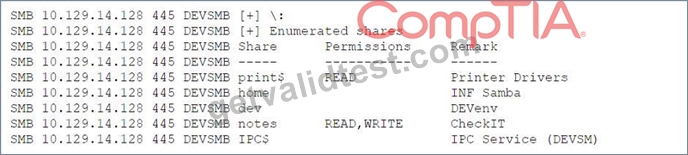
Which of the following should the penetration tester enumerate next?
- A. home
- B. notes
- C. print$
- D. dev
Answer: D
Explanation:
The output displayed is typical of what one might see when using a tool like smbclient or enum4linux to list shared directories on a system that uses the SMB (Server Message Block) protocol. Here's a brief overview of the shared resources that have been found:
1.print$ - This share is generally used for printer drivers.
2.home - Could be a user's home directory, usually requires authentication.
3.dev - Suggests a development environment, possibly containing code, scripts, or tools that could be useful for further penetration.
4.notes - This has read and write permissions and could contain information such as user notes or documentation.
While all these shares could potentially provide valuable information, the dev share stands out for several reasons:
*Development Environment: As it seems to be a development share, it may contain scripts, tools, or code repositories which could be less secure than production environments and possibly contain sensitive information such as hardcoded credentials, configuration files, or backup files.
*Standard Names: Shares like print$ and home are common and are likely to be properly secured or to contain less sensitive information.
*Writable Share: The notes share is also interesting because it has read and write permissions, which could be exploited to upload malicious files or modify existing ones. However, the potential for finding exploitable material or sensitive information might be higher with the dev share.
In penetration testing, the goal is to find the path of least resistance that provides the highest potential for deeper access or sensitive information discovery. The dev share represents a target that could yield such information or further avenues for exploitation, making it the next logical step for enumeration.
NEW QUESTION # 42
When
accessing the URL http://192.168.0-1/validate/user.php, a penetration tester obtained the following output:
..d index: eid in /apache/www/validate/user.php line 12
..d index: uid in /apache/www/validate/user.php line 13
..d index: pw in /apache/www/validate/user.php line 14
..d index: acl in /apache/www/validate/user.php line 15
- A. Insecure data transmission
- B. Insufficient error handling
- C. Incorrect command syntax
- D. Lack of code signing
Answer: B
Explanation:
The most probable cause for this output is insufficient error handling, which is a coding flaw that occurs when a program does not handle errors or exceptions properly or gracefully. Insufficient error handling can result in unwanted or unexpected behavior, such as crashes, hangs, or leaks. In this case, the output shows that the program is displaying warning messages that indicate undefined indexes in the user.php file. These messages reveal the names of the variables and the file path that are used by the program, which can expose sensitive information or clues to an attacker. The program should have implemented error handling mechanisms, such as try-catch blocks, error logging, or sanitizing output, to prevent these messages from being displayed or to handle them appropriately. The other options are not plausible causes for this output.
Lack of code signing is a security flaw that occurs when a program does not have a digital signature that verifies its authenticity and integrity. Incorrect command syntax is a user error that occurs when a command is entered with wrong or missing parameters or options. Insecure data transmission is a security flaw that occurs when data is sent over a network without encryption or protection.
NEW QUESTION # 43
......
Most Reliable CompTIA PT0-003 Training Materials: https://www.getvalidtest.com/PT0-003-exam.html
The Realest Study Materials PT0-003 Dumps: https://drive.google.com/open?id=1jBBdd05ZgXCNGmZd4pn9aLH4l-TJ7Upg