


C_THR92_2211 Exam Brain Dumps - Study Notes and Theory [Sep-2023]
100% Guaranteed Results C_THR92_2211 Unlimited 82 Questions
NEW QUESTION # 36
When you share a canvas report, from where can the user access that report?
Note: There are 2 correct answers to this question.
- A. Report Center
- B. Metrics Panel
- C. Home Page
- D. Reporting Menu
Answer: A,D
NEW QUESTION # 37
You want to join two tables, A and B, and you want to include all rows from Table A, and only matching rows from Table B. Which join type must you use?
- A. Left
- B. Inner
- C. Outer
Answer: A
NEW QUESTION # 38
In the Advanced Reporting tool, you want to create a query where the results meet the following criteria
* Only show one row per employee,
* Only show the pay components Base Salary and Bonus,
* Show these pay components as individual columns.
You have joined the Global Job Information table with the Compensation table.What else must you do?
Note: There are 2 correct answers to this question.
- A. Configure a table restriction of the Global Job Information table.
- B. Change the table join to the Compensation table to an inner join.
- C. Configure a table restriction of the Compensation table.
- D. Duplicate the Compensation table.
Answer: A,C
NEW QUESTION # 39
You want to create a pie chart of your company's headcount by country. For each slice you want to display the proportion by country and the country name. Which formatting options must you select?
Note: There are 2 correct answers to this question.
- A. Rolling Averaqe
- B. Percent of Total
- C. Chart type: Area
- D. Use Smart Labels
Answer: B,D
NEW QUESTION # 40
What functionality can be used in a calculated column? Note: There are 2 correct answers to this question.
- A. If/Then/Else statement
- B. Concatenation
- C. Data type conversion
- D. Average
Answer: A,B
NEW QUESTION # 41
While constructing a dashboard, you find that you need to create a tile that requires more complex configuration than what is available with the Online Tile Builder tool.
What tool can you use to create this tile?
- A. Business Intelligence Reporting Tool (BIRT)
- B. PDFSam
- C. LMS Report Designer
- D. YouCalc designer
Answer: D
NEW QUESTION # 42
Which tool can you use to upload a report from the test instance to the production instance?
Note: There are 2 correct answers to this question.
- A. Report Center
- B. FTP Distribution
- C. Report Distributor
- D. Report Transfer
Answer: A,D
NEW QUESTION # 43
When a user builds a query, what is the default People Scope of the query?
- A. All employees in the department of the logged-in user
- B. Direct Reports of the logged-in user
- C. The matrix reports of the logged-in user
- D. All Reports of the logged-in user
Answer: B
NEW QUESTION # 44
You are creating a calculated column to calculate an employee's organizational tenure.
Why does the formula in the screenshot result in an error?
- A. The result of the formula is negative.
- B. An incorrect dynamic date variable has been used.
- C. An "if then else" statement needs to be included.
- D. An incorrect data type has been selected.
Answer: B
NEW QUESTION # 45
A manager changed jobs and subsequently lost access to a custom tile-based dashboard.
What functionality would an administrator use to restore access?
Note: There are 2 correct answers to this question.
- A. Dynamic Groups
- B. Role Based permission Groups
- C. Role Maintenance
- D. Manage Report Center
Answer: B,C
NEW QUESTION # 46
Which actions can you permit the report consumer to perform by your configuration of Interactive widgets?
Note: There are 3 correct answers to this question.
- A. Show/hide labels.
- B. Adjust filters within controls.
- C. Add/delete widgets.
- D. Switch between edit and view mode.
- E. Freeze table rows/columns.
Answer: A,B,E
NEW QUESTION # 47
You transferred a report to another instance.
Where can you start the validation of this report?
Note: There are 2 correct answers to this question.
- A. Report Distributor -> Validate
- B. Admin Center -> Report - Canvas Validation
- C. Admin Center -> Manage Report Center
- D. Report Center -> Edit the Report
Answer: A,B
NEW QUESTION # 48
What are the steps to create and assign a date filter to a tile?
- A. 1. Enable the date filter in the tile.
2. Create a new date range.
3. Configure the Name, label and date from/date to.
4. Configure end user free selection of date range. - B. 1. Access Date Options.
2. Configure the date type to Date Range.
3. Configure the date from/date to.
4. Enable the date filter in the tile.
5. Configure end user free selection of date range. - C. 1. Enable the date filter in the tile.
2. Access Date Options.
3. Configure date type to Date Range.
4. Configure the date from/date to.
5. Configure end user free selection of date range. - D. 1. Create a new date range.
2. Configure the Name, label and date from/date to.
3. Enable the date filter in the tile.
4. Configure end user free selection of date range.
Answer: B
NEW QUESTION # 49
You want to create a tile-based dashboard and make it available to users. After you created and named the dashboard, which steps are required?
- A. 1. Select tile(s).
2. Save dashboard.
3. Share dashboard. - B. 1. Select tile(s).
2. Select dataset.
3. Save dashboard. - C. 1. Create tiles(s).
2. Select filters.
3. Save dashboard. - D. 1. Create tile(s).
2. Select dataset.
3. Share dashboard.
Answer: D
NEW QUESTION # 50
How do you configure the Builder to display the chart in the screenshot in a story report?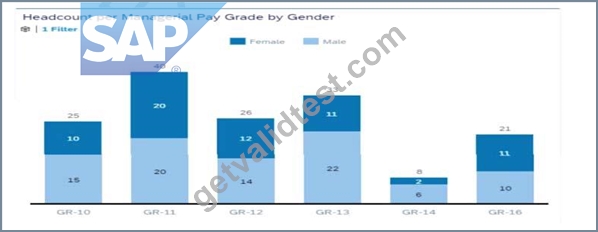
Note: There are 3 correct answers to this question.
- A. Set Color to Gender
- B. Set Measures to EOP Headcount
- C. Set Dimensions to Gender
- D. Set Dimensions to Pay Grade
- E. Set Color to Pay Grade
Answer: A,C,D
NEW QUESTION # 51
What is the first step to make Ad Hoc reporting available for a customer?
- A. Enable Table reports in Admin Center-> Reporting & Analytics.
- B. Enable Ad Hoc report builder and domain schemas in Provisioning.
- C. Enable Table reports by assigning Role Based Permissions.
- D. Enable Table reports in Admin Center-> Upgrade Center.
Answer: B
NEW QUESTION # 52
You are configuring a story report. You add the image widget to the top-left corner of the canvas. You then upload the SuccessFactors logo in the Builder and select the logo image so it displays on the canvas. When you preview the report in View Mode, the logo appears centered on the canvas.
What action do you take so the Logo appears in the top-left corner when viewing the report in view mode?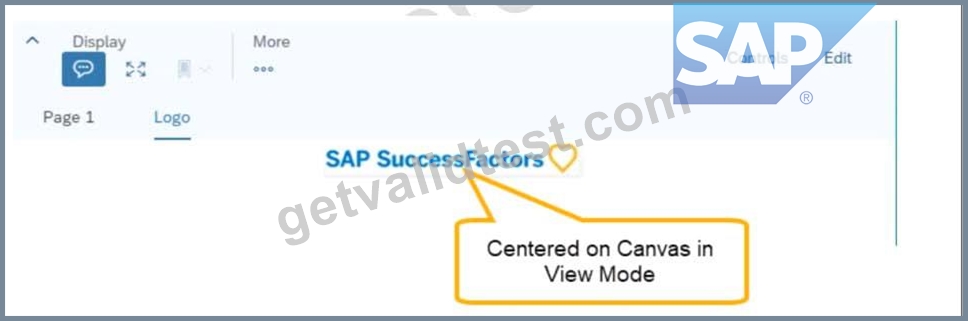
- A. In Builder for the image, set the image to Dynamic.
- B. In Designer Mode, add another widget under the image.
- C. In Styling for the page, set the Page Size to Fixed.
- D. In Styling for the image, set the Image Properties to Pan.
Answer: B
NEW QUESTION # 53
How do you give an analyst permission to build tiles?
- A. Assign the analyst as a dashboard administrator in Provisioning.
- B. Assign the role-based permission in the Manage Dashboards/Reports RBP Category.
- C. Add the analyst to the role-based permission group Dashboard Administrators.
- D. Assign the role-based permission in the Analytics RBP Category.
Answer: B
NEW QUESTION # 54
Where can you obtain the latest versions of the standard report templates provided by SAP Success Factors?
- A. SAP Help Portal
- B. SAP Support Portal
- C. SAP PartnerEdge
- D. SuccessFactors HCM Cloud Operations Portal
Answer: A
NEW QUESTION # 55
When you create a table report with filter groups, what is the logical relationship between filter groups?
- A. AND
- B. OR
- C. NOT
Answer: B
NEW QUESTION # 56
You are creating a query for a historical compensation story report in Query Designer. You have added the Job Information table to the query, configured a scope filter, and previewed the result to verify you are returning the appropriate employees.
You add the related table Compensation to the query.
When you preview the query, you only get the current compensation information for the employees.
Why do you only receive the current records?
Note: There are 2 correct answers to this question.
- A. The compensation table time filter is set to: Same Filter as First Table.
- B. The Job information table time filter is set to: As of Date > Dynamic Date: Today.
- C. The Query Advanced Filter is set to: Job Information effective start date equal to Dynamic Date:
Today. - D. The compensation table time filter is set to: As of Date > Dynamic Date: Today.
Answer: A,B
NEW QUESTION # 57
......
C_THR92_2211 Dumps PDF - Want To Pass C_THR92_2211 Fast: https://www.getvalidtest.com/C_THR92_2211-exam.html
C_THR92_2211 Practice Exam Dumps Exam: https://drive.google.com/open?id=19U5AUFHRuJBq6rv-xEoqFWiUcjrXZca8