


XK0-006 Exam Info and Free Practice Test All-in-One Exam Guide Sep-2026
Pass CompTIA XK0-006 Actual Free Exam Q&As Updated Dump Sep 11, 2026
NEW QUESTION # 104
Which of the following commands is used to ensure a service starts automatically at boot on a system using systemd?
- A. systemctl enable httpd
- B. systemctl status httpd
- C. systemctl reload httpd
- D. systemctl start httpd
Answer: A
Explanation:
The correct answer is B. systemctl enable httpd because it configures a service to start automatically during system boot in systems that use systemd as the init system. The enable command creates the necessary symbolic links between the service unit file and the appropriate target (such as multi- user.target), ensuring the service is launched when the system starts.
NEW QUESTION # 105
A systems administrator needs to open the DNS TCP port on a Linux system from network
10.0.0.0/24. Which of the following commands should the administrator use for this task?
- A. ufw enable 53/tcp from 10.0.0.0/24
- B. ufw allow 53/tcp from 10.0.0.0/24
- C. ufw disable from 10.0.0.0/24
- D. ufw allow dns/tcp to 10.0.0.0/24
Answer: B
Explanation:
The ufw allow 53/tcp from 10.0.0.0/24 command explicitly opens TCP port 53 (DNS) for connections coming from the 10.0.0.0/24 network, which is the correct way to configure this firewall rule.
NEW QUESTION # 106
User1 reports "access denied" errors while trying to execute app. Given the following outputs:
Which of the following options will remediate this issue?
- A. Providing execute permissions to user1 in the ACL
- B. Adding user1 to the wheel group
- C. Moving app to a different folder
- D. Modifying the permissions for others to grant read, write, and execute
Answer: A
Explanation:
According to the output of getfacl app, user1 has only "rw" (read and write) permissions, but lacks
"x" (execute). Without execute permission, user1 cannot run the file. To allow user1 to execute app, you must update the ACL to add execute permission (e.g., setfacl -m u:user1:rwx app).
Modifying "others" permissions (option B) is not secure or necessary, adding user1 to the wheel group (option C) is unrelated, and moving the file (option D) does not resolve permission issues.
NEW QUESTION # 107
A systems administrator wants to check if the ntpd service is configured to start on startup. Which of the following commands will show that information when run?
- A. systemctl start ntpd.service
- B. systemctl is-enabled ntpd.service
- C. systemctl is-active ntpd.service
- D. systemctl stop ntpd.service
Answer: B
NEW QUESTION # 108
Users report that a Linux system is unresponsive and simple commands take too long to complete. The Linux administrator logs in to the system and sees the following: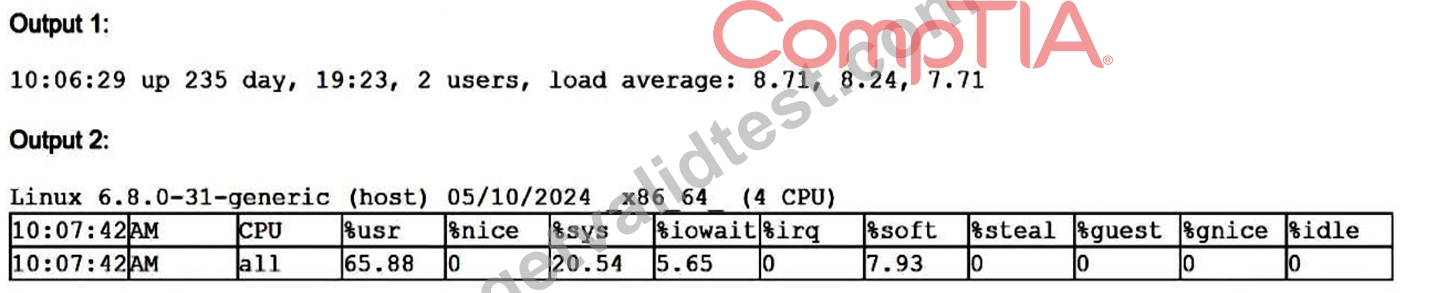
Which of the following is the system experiencing?
- A. High uptime
- B. High CPU load
- C. High I/O wait times
- D. High latency
Answer: B
Explanation:
The load averages (8.71, 8.24, 7.71) are well above the number of CPUs (4), showing CPU saturation. Additionally, Output 2 indicates very high CPU usage (65.88% usr, 20.54% sys) with
0% idle, confirming the system is under heavy CPU load, which explains the unresponsiveness.
NEW QUESTION # 109
Users cannot access an application that is running inside containers. The administrator wants to validate whether the containers are running. Which of the following commands should the administrator use?
- A. docker run
- B. docker images
- C. docker ps
- D. docker start
Answer: C
Explanation:
The docker ps command lists all running containers, allowing the administrator to verify whether the application's containers are active.
NEW QUESTION # 110
A user on a Linux VM is running /work/test.shBash script and receives the following error:
bash: /work/test.sh: Permission denied
After further investigation, the user receives the following outputs:
Which of the following commands should a systems administrator run to fix the issue?
- A. chmod g+x /work/test.sh
- B. mount -o remount,exec /work
- C. mount -o remount,suid /work
- D. chmod o+x /work/test.sh
Answer: B
Explanation:
The script /work/test.sh already has execute permissions (-rwxr--r--), but the filesystem is mounted with the noexec option, which prevents execution of binaries and scripts. Remounting the filesystem with the exec option allows execution of the script.
NEW QUESTION # 111
A systems administrator wants to review the logs from an Apache 2 error.log file in real time and save the information to another file for later review. Which of the following commands should the administrator use?
- A. tail -f /var/log/apache2/error.log > logfile.txt
- B. tail -f /var/log/apache2/error.log | tee logfile.txt
- C. tail -f /var/log/apache2/error.log >> logfile.txt
- D. tail -f /var/log/apache2/error.log | logfile.txt
Answer: B
Explanation:
Log monitoring is a common troubleshooting task in Linux system administration, and Linux+ V8 covers command-line tools for real-time log analysis. The requirement in this scenario is twofold: view log entries as they occur and simultaneously save them to another file.
The command tail -f /var/log/apache2/error.log | tee logfile.txt fulfills both requirements. The tail -f command follows the log file in real time, displaying new entries as they are written. The pipe (|) sends this output to the tee command, which writes the data to logfile.txt while also displaying it on standard output.
The other options are insufficient. Option A redirects output to a file but prevents real-time viewing. Option C appends output but still suppresses terminal display. Option B is syntactically invalid and does not use a proper command for writing output.
Linux+ V8 documentation specifically references tee as a useful utility for duplicating command output streams. This makes option D the correct and most effective solution.
NEW QUESTION # 112
After receiving a monitoring call, an administrator checks the Linux server for processes that have completed execution but have not been removed yet from the process table. Which of the following represents the process state for which the administrator should search?
- A. S
- B. D
- C. Z
- D. T
Answer: C
Explanation:
The correct answer is A. Z, which represents a zombie process in Linux. A zombie process is a process that has completed execution but still has an entry in the process table because its parent process has not yet read its exit status. These processes are also referred to as "defunct" processes.
In Linux process management, each process goes through various states. When a process terminates, it sends a signal (SIGCHLD) to its parent. The parent is responsible for reading the child's exit status using system calls such as wait() or waitpid(). If the parent fails to do so, the child process remains in the process table as a zombie. Although zombie processes do not consume CPU or memory resources, they do occupy process table entries, which can become problematic if many accumulate.
Option B (S) refers to a sleeping process, which is waiting for an event to complete. This is a normal and common process state.
Option C (D) represents an uninterruptible sleep state, typically associated with waiting on I/O operations.
These processes cannot be easily interrupted and are not related to completed execution.
Option D (T) indicates a stopped or traced process, usually paused by a signal such as SIGSTOP or during debugging.
From a Linux+ troubleshooting perspective, identifying zombie processes is important when diagnosing system issues related to process management. Administrators can use commands like ps aux | grep Z to locate such processes and may need to restart or fix the parent process to properly clean them up.
NEW QUESTION # 113
A Linux user frequently tests shell scripts located in the /home/user/scriptsdirectory. Which of the following commands allows the user to run the program by invoking only the script name?
- A. export alias /home/user/scripts='/bin'
- B. export TERM=$TERM=/home/user/scripts
- C. export SHELL=$SHELL=/home/user/scripts
- D. export PATH=$PATH:/home/user/scripts
Answer: D
Explanation:
By appending /home/user/scripts to the PATH environment variable, the user can execute scripts from that directory by simply typing the script name without specifying the full path.
NEW QUESTION # 114
A systems administrator receives reports about connection issues to a secure web server. Given the following firewall and web server outputs:
Firewall output:
Status: active
To Action From
443/tcp DENY Anywhere
443/tcp (v6) DENY Anywhere (v6)
Web server output:
tcp LISTEN 0 4096 *:443 :
Which of the following commands best resolves this issue?
- A. ufw allow 80/tcp
- B. ufw disable
- C. ufw allow 4096/tcp
- D. ufw delete deny https/tcp
Answer: D
Explanation:
This scenario involves firewall configuration and service accessibility, which falls under the Security domain of the CompTIA Linux+ V8 objectives. The key to resolving this issue is interpreting both the firewall output and the web server status correctly.
The web server output shows that the service is actively listening on TCP port 443, which is the standard port for HTTPS (secure web traffic). The line tcp LISTEN 0 4096 *:443 *:* confirms that the web server is running properly and is ready to accept incoming connections on port 443 from any interface. This indicates that the problem is not with the web server configuration itself.
However, the firewall output clearly shows that incoming connections to port 443 are being blocked. The rules 443/tcp DENY Anywhere and 443/tcp (v6) DENY Anywhere (v6) indicate that the Uncomplicated Firewall (UFW) is explicitly denying HTTPS traffic for both IPv4 and IPv6. As a result, external clients cannot establish a secure connection to the server, even though the service is running correctly.
To resolve this issue securely and correctly, the administrator must remove the firewall rule that denies HTTPS traffic. Option C, ufw delete deny https/tcp, directly removes the blocking rule while preserving the rest of the firewall configuration. This aligns with Linux+ best practices, which emphasize making precise firewall changes rather than disabling security controls entirely.
The other options are incorrect. Option A, ufw disable, would completely turn off the firewall, creating a significant security risk. Option B, ufw allow 80/tcp, only opens HTTP traffic on port 80 and does not resolve HTTPS connectivity issues. Option D, ufw allow 4096/tcp, incorrectly attempts to open an internal socket backlog value rather than a valid service port.
Therefore, the correct and most secure solution is C.
NEW QUESTION # 115
A Linux administrator needs to change the execution frequency of a systemd timer. Which of the following commands should the administrator use after editing the timer file to make the changes effective?
- A. systemd-ana1yze time
- B. timedatectl --adjust-system-clock
- C. systemctl daemon-reload
- D. sysctl --load
Answer: C
Explanation:
After modifying a systemd unit file such as a timer, this command reloads systemd's configuration so the updated execution schedule is recognized and applied.
NEW QUESTION # 116
An administrator needs to append the output of a Linux command to an existing file for later analysis. Which of the following command-line strings should the administrator use?
- A. echo ls | sed -i file.txt
- B. tcc ls > awk file.txt
- C. cat ls > file.txt
- D. ls >> file.txt
Answer: D
Explanation:
This command uses output redirection in append mode, adding the command's output to the end of the existing file without overwriting its current contents.
NEW QUESTION # 117
An administrator must secure an account for a user who is going on extended leave. Which of the following steps should the administrator take? (Choose two).
- A. Change the user's shell to /sbin/nologin.
- B. Change the date on the /homefolder to that of the expected return date.
- C. Set the user's files to immutable.
- D. Run the command passwd -l user.
- E. Delete the user's /homefolder.
- F. Instruct the user to log in once per week.
Answer: A,D
Explanation:
passwd -l user locks the user's account by disabling the password, preventing logins.
Change the user's shell to /sbin/nologin ensures the account cannot be used for interactive logins, further securing it.
NEW QUESTION # 118
A Linux administrator needs to create accounts for a list of new users. The user account names have been defined in the USER_LIST variable by executing the following:
USER_LIST= " alice bob charles "
Which of the following commands should the administrator use to successfully create the user accounts?
- A. for username in $USER_LIST; do useradd -m " $username " ; done
- B. echo " $USER_LIST " | until username; do useradd -m " $username " ; done
- C. select username in " $USER_LIST " ; do useradd -m " $username " ; done
- D. echo " $USER_LIST " | while username; do useradd -m " $username " ; done
Answer: A
Explanation:
The correct answer is D. for username in $USER_LIST; do useradd -m " $username " ; done because it correctly iterates through each value in the USER_LIST variable and executes the useradd command for each user. In Bash scripting, a for loop is the most appropriate and commonly used construct for iterating over a list of space-separated values stored in a variable.
The variable USER_LIST= " alice bob charles " contains three usernames separated by spaces. When used in a for loop, Bash automatically splits the string into individual words, assigning each value to the variable username during each iteration. The useradd -m command then creates a new user account and also generates a home directory for each user, which is standard practice in Linux system administration.
Option A is incorrect because the syntax is invalid; a while loop requires a conditional expression or a read statement to process input, which is missing here. Option B is also incorrect because until loops require a condition and are not suitable for iterating over lists in this way. Option C is incorrect because the select statement is used for interactive menu-based selection, not for non-interactive batch processing, and quoting
$USER_LIST would treat the entire string as a single item.
From a Linux+ perspective, understanding shell scripting constructs such as loops is essential for automation and user management tasks. The for loop provides a simple and efficient way to perform repetitive administrative operations, such as creating multiple user accounts, ensuring consistency and saving time in system provisioning.
NEW QUESTION # 119
A Linux administrator needs to analyze a compromised disk for traces of malware. To complete the analysis, the administrator wants to make an exact, block-level copy of the disk. Which of the following commands accomplishes this task?
- A. tar cvzf /tmp/image /dev/sdc
- B. cp -rp /dev/sdc/* /tmp/image
- C. dd if=/dev/sdc of=/tmp/image bs=8192
- D. cpio -i /dev/sdc -ov /tmp/image
Answer: C
Explanation:
Disk forensics and malware analysis fall under the Security domain in the CompTIA Linux+ V8 objectives.
When analyzing a compromised disk, it is critical to preserve the data exactly as it exists, including unused space, deleted files, and hidden metadata. This requires a block-level copy, not a file-level copy.
The dd command is the correct tool for this task. It operates at a low level, copying raw data from an input device (if=/dev/sdc) directly to an output file (of=/tmp/image) without interpreting filesystem structures. This ensures an exact, bit-for-bit replica of the disk, which is essential for forensic integrity and malware analysis.
The bs=8192 option improves performance by specifying a larger block size during copying.
The other options are incorrect. cp -rp copies files and directories but does not capture free space, deleted data, or disk metadata. cpio and tar are archive utilities that operate at the filesystem level and cannot produce a true disk image. These tools also require the filesystem to be mounted and readable, which is not appropriate for forensic preservation.
Linux+ V8 documentation highlights dd as the preferred utility for disk imaging, backups, and forensic investigations. Administrators are also advised to perform such operations on unmounted disks to avoid altering evidence.
Therefore, the correct and best command for creating an exact block-level disk copy is D. dd if=/dev/sdc of=
/tmp/image bs=8192.
NEW QUESTION # 120
A systems administrator reviews the package management history and sees the following entries:
46 install httpd Install 9
47 update -y Upgrade 44
Which of the following commands should the administrator use to undo the installation of the
httpd package from transaction 46?
- A. yum history undo 46
- B. yum rollback 46
- C. yum remove httpd
- D. yum erase 46
Answer: A
Explanation:
The correct answer is B. yum history undo 46 because it directly reverses the specific transaction identified in the YUM history log. In Red Hat-based Linux distributions, the yum history feature allows administrators to view, manage, and undo past package operations. Each transaction is assigned a unique ID, which can be used to reverse changes accurately.
In this scenario, transaction 46 corresponds to the installation of the httpd package. Using the command yum history undo 46 will attempt to revert that exact transaction by removing the installed package and restoring the system to its previous state before that transaction occurred.
This method is precise and preferred in environments where maintaining package consistency is critical.
NEW QUESTION # 121
Which of the following statements best describes Ansible?
- A. A tool that provides automation using playbooks written in YAML
- B. A software configuration tool with its own declarative, Ruby-based language
- C. A tool used for monitoring cloud infrastructure
- D. A CI/CD tool that allows automation using pipelines
Answer: A
Explanation:
The correct answer is D. A tool that provides automation using playbooks written in YAML because Ansible is a widely used automation and configuration management tool that relies on YAML-based playbooks to define system configurations, deployments, and orchestration tasks.
Ansible operates in an agentless manner, meaning it does not require additional software to be installed on managed nodes. Instead, it uses standard protocols such as SSH to communicate with remote systems. The automation logic is written in playbooks, which are human-readable YAML files describing tasks, roles, and desired system states. This simplicity and readability make Ansible especially popular in DevOps and Linux administration environments.
Option A is incorrect because Ansible is not primarily a monitoring tool; tools like Nagios, Prometheus, or Zabbix are used for monitoring infrastructure.
Option B is incorrect because it describes Puppet, which uses a declarative language and is Ruby-based.
Option C is incorrect because it describes CI/CD tools like Jenkins or GitLab CI, which focus on pipeline automation rather than configuration management.
From a Linux+ perspective, Ansible is categorized under automation and orchestration tools. It enables administrators to automate repetitive tasks such as software installation, configuration management, system updates, and deployment processes. Its YAML-based approach reduces complexity and improves maintainability, making it a critical tool in modern infrastructure management and automation workflows.
NEW QUESTION # 122
An administrator has generated an RSA SSH key pair to log in to a remote server. After copying the public key and attempting to log in, the administrator sees the following message:
[email protected]: Permission denied (publickey,password)
After seeing the message, the administrator attempts to connect using ssh -v [email protected] and notices the following debug output:
debug1: send_pubkey_test: no mutual signature algorithm
Which of the following actions should the administrator take first to remediate this issue?
- A. Create a new key pair by running ssh-keygen -t ecdsa.
- B. Issue systemctl restart sshd on the local server.
- C. Set PermitRootLogin yes in the /etc/ssh/sshd_config file.
- D. Update permissions on the /home/admin/.ssh directory to 700 on the remote server.
Answer: A
Explanation:
The "no mutual signature algorithm" error means the RSA/SHA-1 key type (ssh-rsa) isn't supported by both client and server. Generating a new key with a modern algorithm (e.g., ssh- keygen -t ecdsa) ensures a mutually supported signature method.
NEW QUESTION # 123
An administrator is testing whether an application on a server is available remotely under the IP address 192.168.88.188 on port 5000. Which of the following commands should the administrator use to verify the connectivity?
- A. ssh 192.168.88.188 -P 5000
- B. traceroute 192.168.88.188:5000
- C. nc -v 192.168.88.188 5000
- D. tcpdump 'host 192.168.88.188 and port 5000'
Answer: C
Explanation:
The netcat command can actively attempt a TCP connection to a specific IP address and port, making it suitable for verifying whether the application is reachable and listening on port 5000 from a remote system.
NEW QUESTION # 124
Which of the following commands is used to verify whether a port is open on a remote host?
- A. ip
- B. nc
- C. ping
- D. netstat
Answer: B
Explanation:
The nc command can initiate a connection to a specific port on a remote host, making it useful for verifying whether that port is open and reachable over the network.
NEW QUESTION # 125
Application owners are reporting that their application stops responding after several days of running, and they need to restart it. A Linux administrator obtains the following details from the dmesg command:
invoked oom-killer
Call Trace:
out_of_memory
oom_kill_process
The application owners mentioned that resources to the system have been increased, and the error takes longer to appear. Which of the following best describes the reason the process is being terminated by OOM?
- A. The application might have a memory leak.
- B. The kernel has panicked.
- C. The swap configuration is not correctly sized.
- D. The CPU type is incompatible with the application.
Answer: A
Explanation:
The correct answer is C. The application might have a memory leak because the dmesg output clearly shows that the Linux kernel is invoking the OOM (Out Of Memory) killer, which terminates processes when the system runs out of available memory. The presence of entries such as invoked oom-killer, out_of_memory, and oom_kill_process confirms that the system is exhausting its memory resources over time.
A key detail in the scenario is that the application runs for several days before failing, and when system resources (RAM) are increased, the issue takes longer to occur. This behavior is a classic indicator of a memory leak, where an application gradually consumes more memory without releasing it. Instead of stabilizing, memory usage continuously grows until it reaches the system limit, at which point the OOM killer terminates the process to prevent system instability.
Option A (CPU type is incompatible) is incorrect because CPU incompatibility would cause immediate execution failures, not delayed memory exhaustion. Option B (kernel panic) is incorrect because a kernel panic would crash the entire system, not selectively terminate a user-space process. Option D (swap configuration not correctly sized) is partially plausible but not the best answer; while insufficient swap can contribute to OOM conditions, it does not explain the gradual memory consumption pattern observed.
In Linux+ troubleshooting, identifying memory leaks is critical when dealing with long-running applications.
Administrators should monitor memory usage using tools like top, htop, or ps, and investigate application behavior. Applying patches, optimizing code, or restarting services periodically are common mitigation strategies, along with configuring appropriate memory and swap resources.
NEW QUESTION # 126
......
Online Questions - Valid Practice XK0-006 Exam Dumps Test Questions: https://www.getvalidtest.com/XK0-006-exam.html
Latest XK0-006 Actual Free Exam Updated 208 Questions: https://drive.google.com/open?id=1HGVau1A2TFSg2Bx6xm9pbMCajo-37uXL